About
Cheat Engine is a tool to modify single-player games and debug applications. It includes a memory scanner, debugger, disassembler, Speedhack, Lua scripting, and Mono/.NET support.
Full About pageMemory Scanner & Game Modifier
Modify single-player games, debug applications, and learn memory editing.
Free for Windows and Mac. Educational use only.
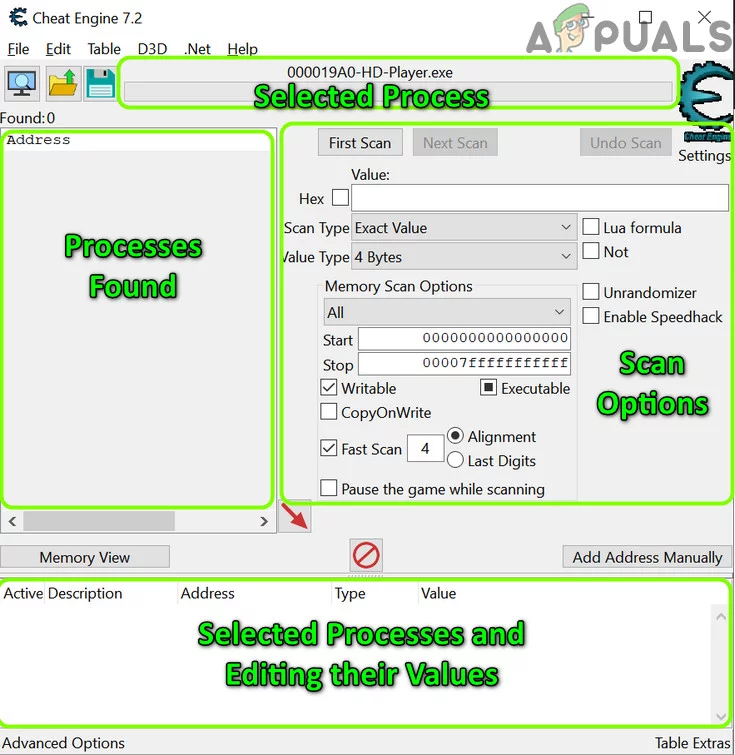
Download Cheat Engine for Windows or Mac. CE 7.6 is the latest public release. Add an antivirus exception if needed.
Built-in CE tutorial (Start Menu), Wiki tutorials, and video guides. Start with the CE tutorial steps 1–5 for scanning basics.
Step-by-step: install CE, attach to a game, First Scan, change value in game, Next Scan, add address and freeze or change it. Run the built-in tutorial first.
Scanning and value types, pointers, code and AOB, Mono/Unity, Lua, performance, and workflow tips.
Cheat Engine is a tool to modify single-player games and debug applications. It includes a memory scanner, debugger, disassembler, Speedhack, Lua scripting, and Mono/.NET support.
Full About pageCommon questions: install, Mac version, online games, antivirus, value types, pointers, Mono, and more.
Full FAQ pageFinding health and gold, pointers, Speedhack, Lua, Mono/Unity, saving .CT tables, and user experiences from the community.
Full Guides pageAntivirus false positive, install fails, can’t attach, too many or zero scan results, pointer scan issues, game closes on attach.
Full Troubleshooting pageScan for values (health, gold, ammo) in running processes and change them. Use unknown value search, increased/decreased value, and more.
Inspect and modify code, set breakpoints, and trace execution. Useful for game modding and software analysis.
Create standalone trainers from your cheat tables. Share your findings with others via .CT files.
Speed up or slow down game time. Handy for grinding or slowing difficult sections.
Extend CE with Lua. Auto-attach, custom UIs, and automation. Check the Lua extensions forum for add-ons.
Dissect Mono and .NET assemblies in-game. Find classes and fields for Unity and other managed games.
Find stable pointer paths to values so your cheat table works after restarting the game. Essential for sharing tables.
See which instruction in the game writes to an address. Use it to patch code for god mode or infinite ammo.
Inject or replace assembly code. NOP instructions, code caves, and AOB scripts for updates-resistant cheats.
Save addresses and scripts in XML tables. Share with others or load later. Tables can include Lua and descriptions.
Search when you don't know the exact number. Use increased/decreased/changed value to narrow results step by step.
Use 4 Bytes for health and ammo; try Float if you get zero results.
Do several Next Scans after changing the value in the game to narrow the list.
Freeze an address by checking the box in the Active column.
Run the built-in CE Tutorial (Start Menu) before touching a real game.
Use pointer scan so your table works after restarting the game.
Only open .CT files from sources you trust; they can run Lua scripts.
For Unity games, try Mono → Dissect mono to find classes and fields.
Speedhack can speed up or slow down time in many single-player games.
Save your table (File → Save) so you don't lose your work.
Memory location where a value is stored
Path to an address that stays valid after restart
Search memory for a value you enter
Narrow results with a new value
Keep writing a value so the game can't change it
Cheat table file (addresses and scripts)
Array of bytes; used to find code for injection
.NET runtime used by many Unity games
Change how fast the game thinks time passes
4 Bytes, Float, Double, etc. for scanning
For changelogs and early access, see Patreon.
CE is often flagged by antivirus as a hacktool. Download from a trusted source and add an exception. Only load .CT files from people you trust.
Usually no. Important data is on the server. Changing values locally won't stick. Do not use CE in ways that violate a game's terms of service.
Memory addresses change between runs. Use a pointer (pointer scan) so your table finds the value every time.
Health and ammo are often 4 Bytes. Try Float for percentages or coordinates. See the Value types guide.
Full support. Download the installer from the Downloads page. CE 7.6 is the latest.
Mac version available (e.g. 7.5.2). Trialware until you support the project on Patreon.
No dedicated build. Some use CE on Linux via Wine. CEServer exists for network scanning.

Install, first scan, next scan, freeze, save
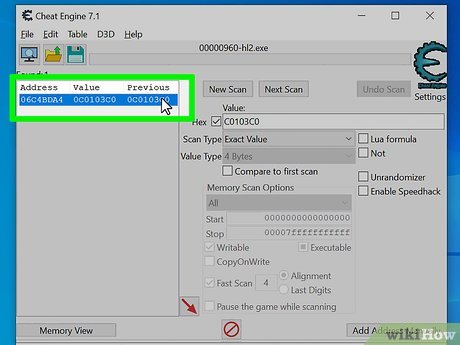
Step-by-step guides and built-in CE tutorial

User stories and practical tips
Value types, unknown value, options
Stable addresses after restart
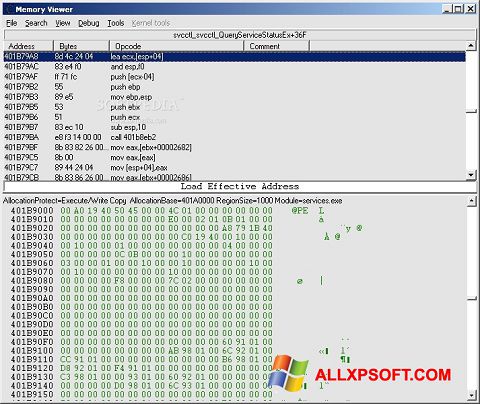
When to use 4 Bytes, Float, Double
Fix install and runtime issues

Common questions answered
Players use CE to adjust difficulty (e.g. more health, infinite ammo), speed up grinding with Speedhack, or experiment with game mechanics in offline titles.
Modders find addresses and code to build trainers, share .CT tables, or create Lua-based tools. Many share their work on the forum.
CE is used to learn about memory layout, pointers, assembly, and debugging. The tutorial and Wiki support educational use.
Professionals and enthusiasts use the debugger and disassembler to analyze how applications work, for security research or compatibility.
Some use Speedhack or value edits in single-player for practice or category-specific runs, where allowed by community rules.
Developers use CE to test their own games, verify that values are stored correctly, or debug memory-related issues.
Do more Next Scans; change the value in the game each time.
Try Float or 8 Bytes; or use Unknown initial value.
Use pointer scan to find a stable path.
Add an exception for the CE folder.
Run CE as administrator; some games use anti-cheat.
Game may detect CE; try attaching before the game loads.
Type the value you see in the game (e.g. 100) and click First Scan. Change the value in the game (e.g. take damage so it becomes 80), type the new value, and click Next Scan. Repeat until you have few addresses. Double-click one to add it to the list, then change or freeze it. If you don't know the exact value, use Unknown initial value and then Increased value or Decreased value after each change in the game.